
Template:Image frame/doc
 | This is a documentation subpage for Template:Image frame. It may contain usage information, categories and other content that is not part of the original template page. |
By filling out the parameters as follows, the result will be as shown below the code.
{{Image frame|width=200|content=[[File:PNG transparency demonstration 1.png|100px]][[File:White Stars 3.svg|100px]]
|caption=Example usage|link=Hello world|align=center}}{{Image frame|width=200|content=[[File:PNG transparency demonstration 1.png|100px]][[File:White Stars 3.svg|100px]]
|caption=Example usage|link=Hello world|align=center|pos=top}}
{{image frame|align=left|border=no|caption=A [[Help:Gallery tag|gallery]] in an image frame|content=
<gallery mode="packed">
3025_Atlas1.jpg|Original AS7-D ''Atlas'' from ''[[Technical Readout: 3025|TRO:3025]]''
3050 Atlas.jpg|AS7-K ''Atlas'' from ''[[Technical Readout: 3050|TRO:3050]]''
3050U Atlas.jpg|AS7-K ''Atlas'' from ''[[Technical Readout: 3050 Upgrade|TRO:3050 Upgrade]]''
AS7-K2 Atlas.jpg|AS7-K2 ''Atlas'' from ''[[Technical Readout: 3085|TRO:3085]]''
</gallery>
}}-
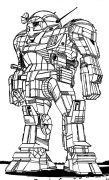 Original AS7-D Atlas from TRO:3025
 -
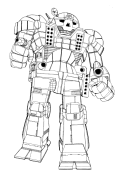 AS7-K Atlas from TRO:3050
 -
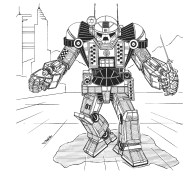 AS7-K Atlas from TRO:3050 Upgrade
 -
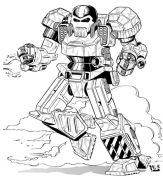 AS7-K2 Atlas from TRO:3085


Maintenance categories
Templatedata
TemplateData for Image frame
This template creates a frame like those surrounding images. This template can be used to put two or more images into a frame together, or as a wrapper for more complicated templates like Template:Superimpose.
| Parameter | Description | Type | Status | |
|---|---|---|---|---|
| Content | content | Content of the main section (generally images). | Content | required |
| Width | width | The width of the image within the frame, in pixels (though do not add "px" to the width e.g., use width=175 and not width=175px).
| Number | suggested |
| Alignment | align | "left" and "right" float the image to that side. "center" centres the image, and "none" left-aligns it without floating.
| String | optional |
| Caption position | pos | Where to put the caption. Valid values: top, bottom.
| String | optional |
| Inner frame style | innerstyle | Plain CSS to apply to the inner frame. Use with care.
| String | optional |
| Link | link | Link for the "Enlarge" link in the caption (in the future, may also be used as the link for the image field inside the frame, though it would probably require an additional height parameter). | Page name | optional |
| Alternative link text | link_text | Alternative text used for the link for the "Enlarge" link in the caption, usually displayed as tooltip. | String | optional |
| Link override | linkoverride | Completely replaces the 'info' link. | Line | optional |
| Caption | caption | no description | Content | optional |
| Border | border | Border of the main section (generally images).
| Content | optional |
| Mode | mode | Display mode of the main section, "scrollable" will make the content scrolling if the content is longer than viewport. | String | optional |
| Maximum width | max-width | The maximum width of the image within the frame, in pixels (though do not add "px" to the width e.g., use max-width=350 and not max-width=350px), valid only in scrollable mode.
| Number | suggested |
| Direction | dir | Use the value "rtl" to make the right side of the image the initial visible portion inside the scroll frame, valid only in scrollable mode. | String | optional |
| Style | style | Plain css to apply to the outer frame | Content | optional |
See also
- Wikipedia:Extended image syntax
- For
[[File: .. |thumb ..or[[Image .. |et cetera.
- For
{{gallery}}{{align}}{{center}},{{right}}and{{left}}